
Thank you for subscribing to Change the World Films Insider.
Many e-mail and Internet companies are now using programs to block unwanted e-mail, often called spam. Sometimes, however, these programs block e-mail you want to get.
To Ensure You Are Receiving Your Walk a Mile Project Emails, Simply Do The Following:
First, please note that all Walk a Mile Project emails are sent from Change the World Films. So be sure to add the corresponding Change the World Films email address (support@changetheworldfilms.studio) to your email white list to ensure the best chance of receiving our content and updates
A whitelist is a list of accepted items or persons in a set…. a list of e-mail addresses or domain names from which an e-mail blocking program will allow messages to be received.
Why is this important?
Unsolicited, unwanted advertising e-mail, commonly known as “spam”, has become a big problem. It’s reached the point that most e-mail services and Internet Service Providers (ISPs) put a blocking or filtering system in place or rely on “blacklists” to tell the good guys from the bad.
It’s a good intention to protect you from spam, but everyone agrees that the current systems for stopping spam are far from perfect. They often block e-mail you’ve actually requested, but that fits someone else’s idea of what spam looks like! The more responsible anti-spam activists are working hard to cut down on these “false positives”, but in the mean time, you might unexpectedly find you’re not getting your requested content from us.
Thankfully there’s an easy step you can take to keep your Walk a Mile Project content from falling into the false positive trap: you can add them to a “white-list”.
White-list us now, before your delivery is interrupted.
Of course, every e-mail system is different. Below are instructions for some of the more popular ones. If yours isn’t listed, please contact your ISP’s customer service for instructions. If you’re using some sort of spam filtering or blocking software yourself (in addition to what your ISP provides), we’ve also listed instructions on how to exempt your subscription from some of those programs as well.
GMAIL
- In your inbox, locate an email from support@changetheworldfilms.studio (most likely your welcome mail).
- Drag this email to the “primary” tab of your inbox.
- You’ll see that our emails will go to your primary folder in the future!
YAHOO! MAIL
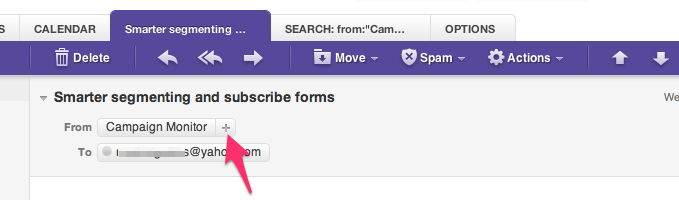
When opening an email message, a “+” symbol should display next to From: and the sender’s name. Select this and an “Add to contacts” pop-up should appear. Select “Save”:
APPLE MAIL
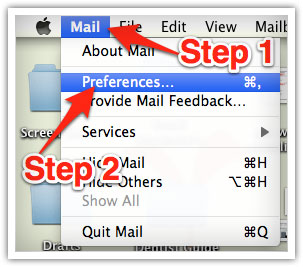
Select “Mail” and “Preferences” from the top menu.
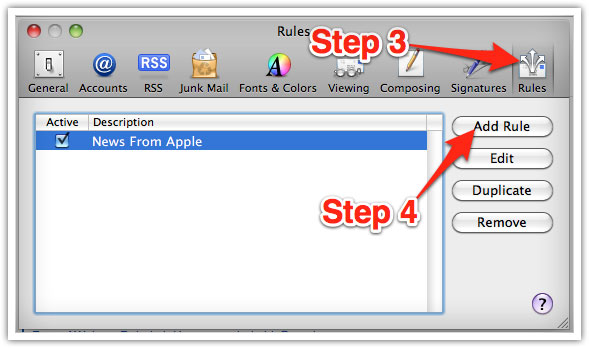
In the “Preferences” window, click the “Rules” icon.
Click the “Add Rule” button.
In the “Rules” window, type a name for your rule in the “Description” field.
Use the following settings: “If any of the following conditions are met: From Contains.”
Type the sender’s email address in the text field beside “Contains.”
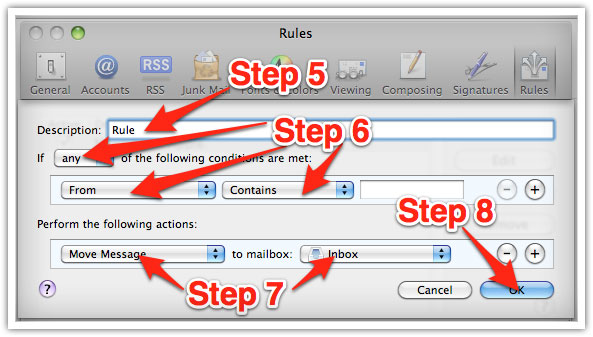
Select “Move Message” and “Inbox” from the drop-down menus.Click “Ok” to save the rule.
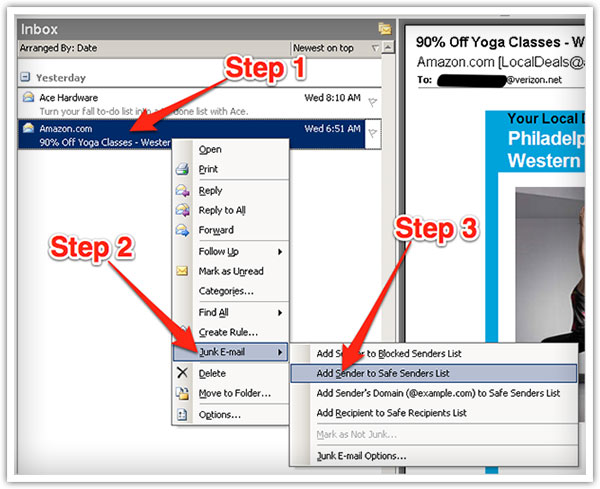
OUTLOOK MAIL
Right-click on the message in your inbox.
Select “Junk E-mail” from the menu.
Click “Add Sender to Safe Senders List.”
If you have any questions, please contact us.